Best Robot Toys for Kids of 2026
Seven robot toys ranked for what kids actually do with them: play, talk, code or keep a robot pet, with battery life, subscriptions and camera privacy spelled out.
By , research by the BestBots team · Updated Oct 19, 2026
Fact checked against each company's published pricing, documentation and verified user ratings. How we score
Wonder Workshop Dash is the best robot toy for most kids: it works out of the box, reacts to voices and obstacles, runs about 5 hours per charge and grows into coding from age 6 to 11. Pick Miko 3 for a talking AI companion, Loona for a robot pet and Sphero Mini for a well rated budget gift.
Our top picks





How to choose
Decide what the robot is for before you look at features.
- Play and personality: Dash, Loona and Eilik have characters kids bond with. Dash moves and reacts; Loona acts like a pet; Eilik stays on the desk.
- Conversation: Miko 3 and Loona talk back. Miko is built for ages 5 to 10 with moderated chat; Loona uses ChatGPT.
- Learning to code: Dash, Sphero Mini, BOLT+ and Botley double as coding robots. If coding is the main goal, see Best Coding Robots for Kids.
- Screens: Botley and Eilik need no app at all. Dash, Sphero and Loona need a phone or tablet for most features. Miko has its own screen.
- Battery: short play times frustrate kids. Miko 3 runs 6 to 7 hours and Dash about 5; Loona about 2 and Sphero Mini about 45 minutes.
Our picks, in detail
- Ages
- 5 to 14 per Wonder Workshop; 6 to 11 per the Amazon listing
- Screen needed
- Yes, tablet, phone or Chromebook; no internet needed once apps are installed
- Battery
- About 5 hours of active play; charges in under an hour; not user replaceable
- Coding
- Blockly, Wonder, Blockly Pro and Path apps
Dash is the rare robot that is fun on day one and still useful a year later. It sings, dances, responds to voices and the direction of sounds, sees obstacles front and back, and runs about 5 hours per charge, then grows into block coding. It holds 4.6 on Amazon from 2,260 ratings.
Pros
- No assembly; works out of the box
- Responds to voice and sound direction
- Up to 5 hours of play per charge
- 4.6 on Amazon from 2,260 ratings
Cons
- Battery is not user replaceable
- Apps rate 4.1 to 4.3 on the App Store
- Accessories (launcher, gripper) cost extra
Skip it if you want a robot that talks back in full sentences; that is Miko 3.
- Ages
- 5 to 10
- Screen needed
- No, built in screen; parent app for setup
- Battery
- About 6 to 7 hours of play, about 4 hours to charge
- Coding
- Coding activities listed under Miko Max content
Miko 3 holds moderated conversations, plays games and tells stories, with a kidSAFE seal and a parent app that sets time limits and deletes data. It plays about 6 to 7 hours per charge. Most premium content needs Miko Max at $14.99 per month or $99 per year.
Pros
- Conversations moderated for children, kidSAFE seal
- 6 to 7 hours of play per charge
- Parent app with time limits and data deletion
- 1 year warranty and 30 day money back guarantee
Cons
- Key features are limited without Miko Max
- Camera and microphone in a child's room
- Out of stock on Amazon at our check
- Little real coding compared with Dash or Sphero
Skip it if you do not want a subscription or a camera in a child's room.
- Ages
- Not stated; marketed to families with kids
- Screen needed
- App for games and coding
- Battery
- About 2 hours of play; auto return to dock; about 2.5 hours to charge
- Coding
- Google Blockly in the Loona app
Loona follows kids around, recognizes faces and gestures with a camera and 3D ToF sensor, fetches balls, chats through ChatGPT and drives itself back to its dock. It also teaches Blockly coding in its app.
Pros
- Face and gesture recognition with follow mode
- Auto docking when battery is low
- ChatGPT conversations and Blockly coding
- Doubles as a home monitor
Cons
- About 2 hours per charge
- 3.9 on Amazon from 1,014 ratings; charging complaints addressed by the V28 update
- Camera and microphones in the home
- Dock sold as a bundle add on on the brand store
Skip it if battery life or reliability is the priority: about 2 hours per charge and 3.9 on Amazon from 1,014 ratings.
- Ages
- 8+ per Amazon listing; adult supervision under 8
- Screen needed
- Yes
- Battery
- About 45 minutes per Sphero (1 hour per the Amazon listing); micro USB
- Coding
- Draw, Blocks and JavaScript in Sphero Edu
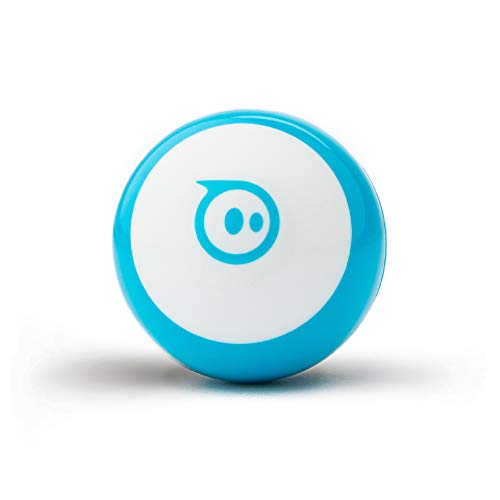
Sphero Mini is a ping pong ball sized robot that kids drive, race through cones and use as a game controller in Sphero Play, with real coding in Sphero Edu when they are ready. It rates 4.6 on Amazon from 5,588 ratings, the deepest history here.
Pros
- Same Sphero Edu coding path as BOLT+
- Sphero Play games keep it in use
- 4.6 on Amazon from 5,588 ratings, the deepest history here
- Cones and pins included for obstacle courses
Cons
- About 45 minutes of play per charge
- No Python and no screen
- Small parts under the shell
Skip it if for under 8s; the shell opens to small parts.
- Ages
- 5 to 7 (per the Amazon listing title)
- Screen needed
- No
- Battery
- Not published
- Coding
- Screen free: remote programmer plus 40 coding cards; multi step paths, 45 degree turns, 16 secret codes
Botley 2.0 needs no screen: kids program it with a remote and coding cards and send it through mazes built from the 78 piece set. Lights, sounds and 16 secret codes keep it playful. 4.5 on Amazon from 1,901 ratings.
Pros
- No phone, tablet or app needed
- Remote programmer teaches sequencing directly
- 78 piece set builds mazes out of the box
- 4.5 on Amazon from 1,901 ratings
Cons
- Outgrown by about age 8
- No block or text coding path
- Learning Resources product pages blocked our fetch, so specs here come from the Amazon listing
Skip it if for kids 8 and up.
- Ages
- Not stated; marketed to kids and adults
- Screen needed
- No
- Battery
- Not published
- Coding
- None
Eilik is a palm sized robot with an animated face that reacts to touch and being picked up, and two or more Eiliks interact with each other. No setup is needed, and it rates 4.3 on Amazon from 3,342 ratings.
Pros
- Works out of the box, no setup
- Two or more Eiliks interact with each other
- Regular updates add animations and games
- 4.3 on Amazon from 3,342 ratings
Cons
- Stays on the desk; does not roam
- No coding
- AI conversation needs the separately sold AI Station
- EnergizeLab app rates 3.1 from 49
Skip it if you want a robot that moves around the room or teaches coding.
- Ages
- Grades 3 to 10
- Screen needed
- Yes: iOS, Android, Windows, macOS, ChromeOS or a browser
- Battery
- All day battery per Sphero; Qi wireless charging
- Coding
- Draw, Blocks, Python and JavaScript in Sphero Edu
BOLT+ is a waterproof robot ball with an LCD screen and wireless charging that a 9 year old can drive and a 15 year old can program in Python or JavaScript. It covers grades 3 to 10.
Pros
- Blocks to Python and JavaScript on one robot
- Waterproof shell and wireless charging
- LCD screen shows animations and live sensor data
- Free standards aligned lessons in Sphero Central
Cons
- Needs a phone, tablet or computer
- Only 65 Amazon ratings for BOLT+ so far
- Nothing to build; it is a sealed ball
Skip it if your child wants a character robot rather than a coding tool.
Robot toys compared
| Robot | Type | Ages | Battery | Camera | Subscription | Amazon rating |
|---|---|---|---|---|---|---|
| Wonder Workshop Dash | Play and coding | 5 to 14 | About 5 h | No | No | 4.6 (2,260) |
| Miko 3 | AI companion | 5 to 10 | 6 to 7 h | Yes | Miko Max optional, most content | Out of stock at check |
| KEYi Loona | Robot pet | Not stated | About 2 h, auto dock | Yes, 720p | No | 3.9 (1,014) |
| Sphero Mini | Play and coding | 8+ | About 45 min | No | No | 4.6 (5,588) |
| Botley 2.0 | Screen free coding | 5 to 7 | Not published | No | No | 4.5 (1,901) |
| Eilik | Desk companion | Not stated | Not published | No | No (AI Station sold separately) | 4.3 (3,342) |
| Sphero BOLT+ | Coding robot | Grades 3 to 10 | All day, wireless | No | No | 4.5 (65) |
Picks by age
| Age | Pick | Why |
|---|---|---|
| 4 to 5 | Botley 2.0 or Sphero indi | Screen free, simple sequences |
| 5 to 7 | Botley 2.0, Miko 3 | Remote coding; moderated AI chat |
| 6 to 11 | Dash | Personality plus block coding, no assembly |
| 8 to 12 | Sphero Mini, Loona | Games and driving; a robot pet with coding |
| 9 to 16 | Sphero BOLT+ | Blocks to Python on one robot |
| Teens and adults | Eilik | A desk companion with no setup |
AI companions and privacy
Two of these picks carry cameras and microphones into a child's space. Miko 3 has a wide angle HD camera, listens for a wake word and moderates conversations for kids; Miko lists a kidSAFE seal, parental time limits, feature controls and data deletion in its parent app. Loona has a 720p camera, a 3D ToF sensor and four microphones, chats through ChatGPT and Amazon Lex, and doubles as a home monitor you can view remotely.
Before you set one up: put it in a shared room rather than a bedroom, read what the parent app stores, turn off remote viewing if you do not need it, and use the data deletion controls. Dash, Sphero, Botley and Eilik have no cameras.
What it costs
BestBots does not list prices for robots sold on Amazon or retail. Check each pick's link for the current price. Costs after the box:
- Subscriptions: Miko Max is $14.99 per month or $99 per year, per miko.ai, and opens full stories, Disney content, progress reports and parental controls. None of the other picks need one.
- Add ons: Loona's charging dock comes in bundles on KEYi's store; Eilik's AI Station and Panxer are sold separately; Dash and Botley have accessory sets.
- Batteries: all picks here are rechargeable. Dash's battery is not user replaceable.
- Warranty: Miko 3 and Loona list 1 year; Miko adds a 30 day money back guarantee.
Robot pet or AI companion
The two talking picks solve different problems. Miko 3 is a screen on wheels built around conversation and content: it answers questions, tells stories, plays learning games and reports progress to parents, and it stays where you put it on a table or floor. Its value depends on the content library, which is why Miko Max matters.
Loona is built around movement and play. It drives after kids, chases a laser pen, fetches a ball, recognizes faces and gestures and finds its own way back to the dock. Its conversations run through ChatGPT, and its app adds games and Blockly coding. Kids who want something that acts like a pet pick Loona; kids who want to talk and learn pick Miko.
Eilik is the third type: a small desk robot that reacts with expressions when you touch or pick it up. It is closer to a fidget toy with a personality than a companion, and it is the easiest of the three to own, with no app setup.
Gift checklist
- Charge before wrapping. Most of these ship partly charged; a dead robot on the morning it is opened is a bad start.
- Install the app first. Dash, Sphero and Loona need their app downloaded and the robot paired. Do it the night before.
- Check the device. Sphero Edu runs on iOS, Android, Windows, macOS, ChromeOS and the web. Dash's apps run on iOS, Android and Fire OS, and on a laptop or Chromebook through the web.
- Plan for the subscription. If you buy Miko 3, decide on Miko Max before the first day, so the best content is not locked on day two.
- Add the accessories that matter. Loona's dock bundle and Dash's launcher get the most use.
Red flags
- No name "AI robots" with ChatGPT in the title. Many listings bolt a chatbot onto a toy with no parental controls or privacy policy you can find. Stick to brands with a named app and visible ratings.
- Subscriptions hidden in the fine print. Check what works without a plan. Miko 3's free tier is limited.
- Short batteries sold as "all day." Compare listed minutes, not adjectives.
- Camera robots in bedrooms. Remote viewing is a feature for adults and a risk for kids.
- Ratings from a different model. Bundles and older versions share listings; check the exact product.
How we picked
We compared the robot toys most often named in top search results and US retail listings in October 2026, using brand product pages for ages, sensors, battery and subscriptions, and Amazon and App Store listings for ratings with counts. We did not test these robots. Ranking favors lasting play value, then age fit, privacy and owner ratings. Scores follow /how-we-score.
Frequently asked questions
What is the best robot toy for kids?
Wonder Workshop Dash for most kids 6 to 11. It works out of the box, reacts to voices and obstacles, runs about 5 hours per charge and grows into block coding. For a talking AI companion, Miko 3; for a robot pet, Loona.
What is the best AI robot for kids?
Miko 3, because its conversations are moderated for children, it carries a kidSAFE seal and the parent app sets time limits and deletes data. Budget for Miko Max ($14.99 per month or $99 per year) to get most content.
What is the best robot pet for kids?
Loona. It follows, fetches, recognizes faces and gestures and returns to its dock to charge. The tradeoffs are about 2 hours per charge and a 3.9 Amazon rating from 1,014 ratings, lower than our other picks.
What robot toy is best for a 5 year old?
Botley 2.0. It is coded with a remote and cards, needs no screen and lists ages 5 to 7. Sphero indi is the other screen free option and starts at pre K.
What robot toy is best for an 8 to 10 year old?
Dash or Sphero Mini for play plus block coding, Miko 3 for conversation, and Sphero BOLT+ if they are already into coding. Makeblock mBot2 suits kids who want to build their own robot.
Are AI robots safe for kids?
Check three things: whether conversations are moderated, what the camera and microphone record, and what the parent app lets you delete. Miko lists a kidSAFE seal, parental controls and data deletion. Loona's camera doubles as a home monitor, so set it up with that in mind.
Do kids robots need a subscription?
Most do not. Dash, Sphero, Botley and Eilik work without one. Miko 3 limits key features without Miko Max, and Eilik's AI conversations need the separately sold AI Station.
What is the difference between a robot toy and a coding robot?
A robot toy is built for play and personality; a coding robot is built to be programmed. The best picks do both: Dash and Sphero are fun to drive and teach real coding. See our coding robot guide for picks ranked on learning path.